Online tutoring lets you teach students across the world from home, using Tutorful’s online classroom built into the website. With a webcam and microphone, you can see and hear your student, and use tools like the interactive whiteboard to share documents and enhance lessons.
Online teaching course
The free online teaching course covers planning lessons, managing your online classroom, communicating with students, and troubleshooting, all tailored to the online environment.
Trying out the classroom
Every online lesson booked on our system creates a private classroom for you and your student to enter at the scheduled time.
We highly recommend familiarising yourself with the classroom before teaching a real lesson, so you can test your browser, trial the features, and contact us with any questions. To do this, select Demo Classroom from the drop-down under your profile picture in the top right.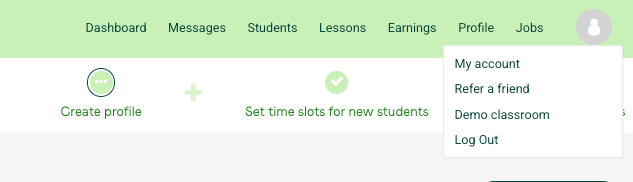
Inside a sample maths lesson
A tutorial video walks you through a real maths lesson in Lessonspace, showing how the tools and teaching flow come together. It covers:
- Combining features in action: the Comms Dock alongside whiteboard tools, document tabs, and layout modes.
- Practical teaching flow: how a tutor introduces a concept, annotates equations, and keeps the lesson engaging.
- Effective tool use: how tabs, annotations, and interactivity support student understanding.
What to do next
For more on booking and joining lessons, see:
- How do I book a lesson? (For Tutors).
- How do I request a lesson? (For Students and Parents).
- How do I join my Online Lesson?
Was this article helpful?
That’s Great!
Thank you for your feedback
Sorry! We couldn't be helpful
Thank you for your feedback
Feedback sent
We appreciate your effort and will try to fix the article