You need an Enhanced DBS to work with Tutorful. If you’re applying and haven’t uploaded an acceptable check, we’ll send you a link to apply through our partner, uCheck, once we’re happy to proceed. If you’ve tutored with us before and want to return, contact our Engagement team on live chat or at support@tutorful.co.uk for a link.
The uCheck application process
- Click the link and complete the Enhanced DBS application, then pay.
- uCheck asks you to download the Post Office app or Yoti for digital ID verification. This is recommended, as it significantly speeds up your application, but it isn’t mandatory. If you can’t use it, we’ll verify your ID documents manually.
- If you use digital ID, you only need two documents, your passport and driving licence. We’d still recommend adding a proof-of-address document in case of issues.
- We countersign your application, then pass it to your local authority for the background check.
Once the check is done, you’ll receive the certificate in the post to upload to your Tutorful account.
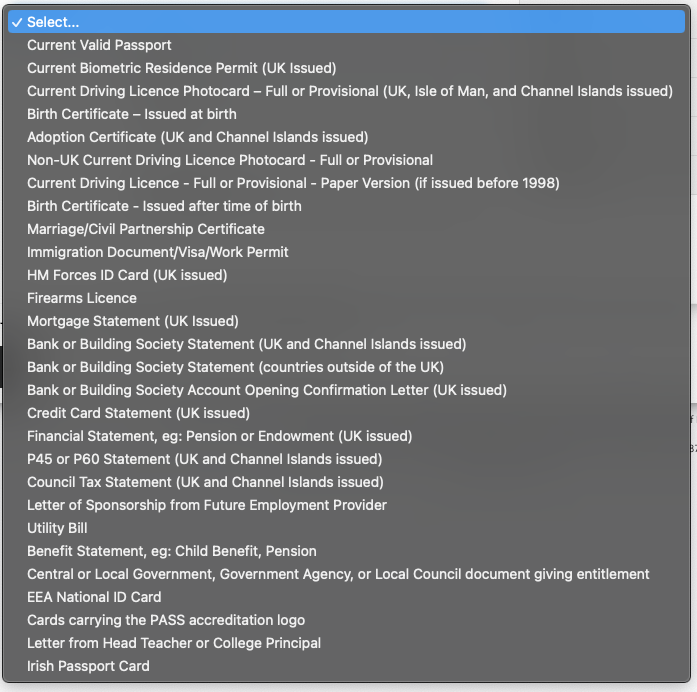
If you can’t complete digital ID: acceptable documents
We can verify your identity manually. For this, provide at least three documents:
- A photo ID document
- A proof of address document
- An additional document, either another photo ID or another proof of address
Upload three documents meeting these requirements during the application.
Checking your application status
Once your application is with your local authority, contact us for an E-Code to give to the Disclosure and Barring Service, who can then give you updates. Once the application has reached the DBS service, we can’t provide further updates, so use the E-Code to check status directly with them.
Once you’ve got your check
Photograph or scan the certificate and upload it to your Tutorful account. Make sure the image shows everything from the certificate number down to the fifth box, “Other Relevant Information”. You don’t need the white section at the top with your address; leaving it out helps the certificate fit a normal photo or A4 scan.
What to do next
For upload instructions, see How do I upload my DBS?
Was this article helpful?
That’s Great!
Thank you for your feedback
Sorry! We couldn't be helpful
Thank you for your feedback
Feedback sent
We appreciate your effort and will try to fix the article